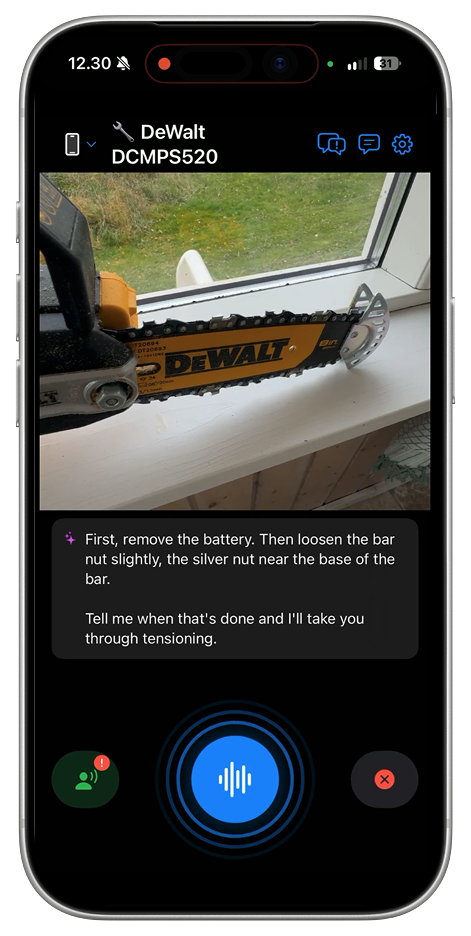
Step 3 heyXpert walks a user through tensioning a chainsaw chain.
Upload your own manuals
Add your manuals, procedures and work instructions. heyXpert turns them into an assistant your workers can ask. No manual to hand? Snap a photo of the product and heyXpert finds it.
Ask by voice, text or camera
Speak naturally, type, or point at the part you mean — on your phone or smart glasses.
Get answers from the manual
Step-by-step guidance from your documentation, in your own language.
Call the expert
When AI isn’t enough, say “Call the expert” for a live video call with a specialist who sees what you see. The expert joins from any web browser or Microsoft Teams, with nothing to install, and sees the AI conversation so far next to the live video.
How the two sides work together
Two people, one loop: Your expert teaches heyXpert, and heyXpert answers every operator.
For the operator: Answers on the line
0:00 / 0:00
Your own manuals. Answers come from your company’s documents, not the internet.
Glasses or phone. Works on Ray-Ban Meta or Mentra Live smart glasses, or any iPhone.
Sees what the worker sees. The camera helps identify equipment and the next step.
For the expert: Teach it once, it answers every shift
0:00 / 0:00
Ready in minutes. Photograph the machine or upload your manuals, and heyXpert builds the assistant.
Teach it by talking. Hear a wrong answer at the machine? Correct it out loud, and it’s saved as an expert instruction.
Your know-how, on every shift. The late shift gets your answer without calling you.
Why frontline teams choose
Natural conversations
Fast speech recognition and quick replies make talking to heyXpert feel natural in the field.
Multilingual by design
Each worker uses heyXpert in their own language, from the same manuals.
Reliable, source-based answers
Answers come from your own documentation. If the information isn’t there, heyXpert says so instead of guessing.
Easy setup for workers
Workers get an invitation link. One tap, install the app if needed, and they’re signed in and ready to go.
Security & enterprise
Secure and ready for enterprise
Built for business-critical frontline work, with EU hosting, central access control and privacy-first data handling across teams and sites.
EU hosting on Azure
heyXpert runs on Microsoft Azure in the EU, where your documents are stored. Some AI processing may take place in the US, depending on your plan.
On your device
Conversations with heyXpert stay on the device. Users can delete their account and data at any time.
Team access control
Admin, editor and member roles, with a personal sign-in for each person. Admins invite their own team and can remove anyone’s access at any time.
Your company’s approved AI
Connect your own Azure OpenAI deployment, so heyXpert runs on the AI your IT has already approved, under your own agreement.
Choose your AI model
Automatic failover across Claude, Gemini and Azure OpenAI. Pick the model that fits your compliance needs.
Guardrails built in
Server-enforced usage limits, abuse protection and a 30-day recycle bin for deleted assistants.